Image Effects Component for ColdFusion 8's CFImage Tag

Included Image Effects
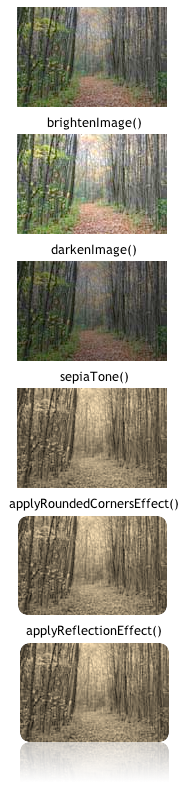
The following effects are included in the CFC CFImageEffects
Gradient Filled Rectangle Effect
The gradient effect is a drawing function that creates a gradient filled rectangle based on the colors you specify.
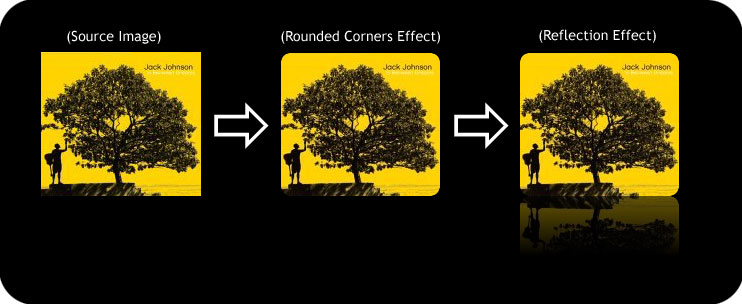
Reflection Effect
The reflection effect has become a popular staple of modern web design thanks to Apple Computer. This effect is seen in several Apple applications including iTunes and the iPhone. The reflection effect makes the surface under your image appear glassy and shiny. You specify the background surface color.
Rounded Corners Effect
Adding rounded corners is a great way to make an ordinary photo look better. This function will take a photo or picture and round its corners.
Drop Shadow Effect
Drop shadows are another great way to make a photo stand out. A shadow is added to any image you pass in.
Sepia Tone Effect
Sepia tone is a great effect to apply to photographs. It adds similar artistic effect as grayscale does to a photo, however it uses brown and yellow tones.
Plastic Effect
This effect adds a plastic look to your image.
Darken & Lighten Effect
Sometimes you just want to make a photo darker, or lighter - we have you covered.
CFImage Effects Component Quick Reference
| Function Name | Arguments |
|---|---|
drawGradientFilledRect |
(imageObj, x, y, width, height, startColor, endColor, gradientDirection) |
applyReflectionEffect |
(imageObj [, backgroundColor, mirrorHeight, startOpacity]) |
applyPlasticEffect |
(imageObj [, backgroundColor, startOpacity, endOpacity]) |
applyRoundedCornersEffect |
(imageObj [, backgroundColor, cornerSize]) |
applyDropShadowEffect |
(imageObj [, backgroundColor, shadowColor, shadowWidth, shadowDistance]) |
brightenImage |
(imageObj) |
darkenImage |
(imageObj) |
sepiaTone |
(imageObj) |
View CFImageEffects Component Documentation
System Requirements
ColdFusion 8 or greater.
Buy it
Image Effects for CFImage with source code.
$49.99
An additional license is required for each server instance this product is used on.
Orders are processed by PayPal, you don't need to join PayPal to order.
Ordering Information
Still running ColdFusion 6 or ColdFusion 7? No worries. We have an Image Resize UDF that's super easy to use.